Virtual Brain Inference (VBI)

The Virtual Brain Inference (VBI) toolkit is an open-source, flexible solution tailored for probabilistic inference on virtual brain models. It integrates computational models with personalized anatomical data to deepen the understanding of brain dynamics and neurological processes. VBI supports fast simulations, comprehensive feature extraction, and employs deep neural density estimators to handle various neuroimaging data types. Its goal is to bridge the gap in solving the inverse problem of identifying control parameters that best explain observed data, thereby making these models applicable for clinical settings. VBI leverages high-performance computing through GPU acceleration and C++ code to ensure efficiency in processing.
Workflow
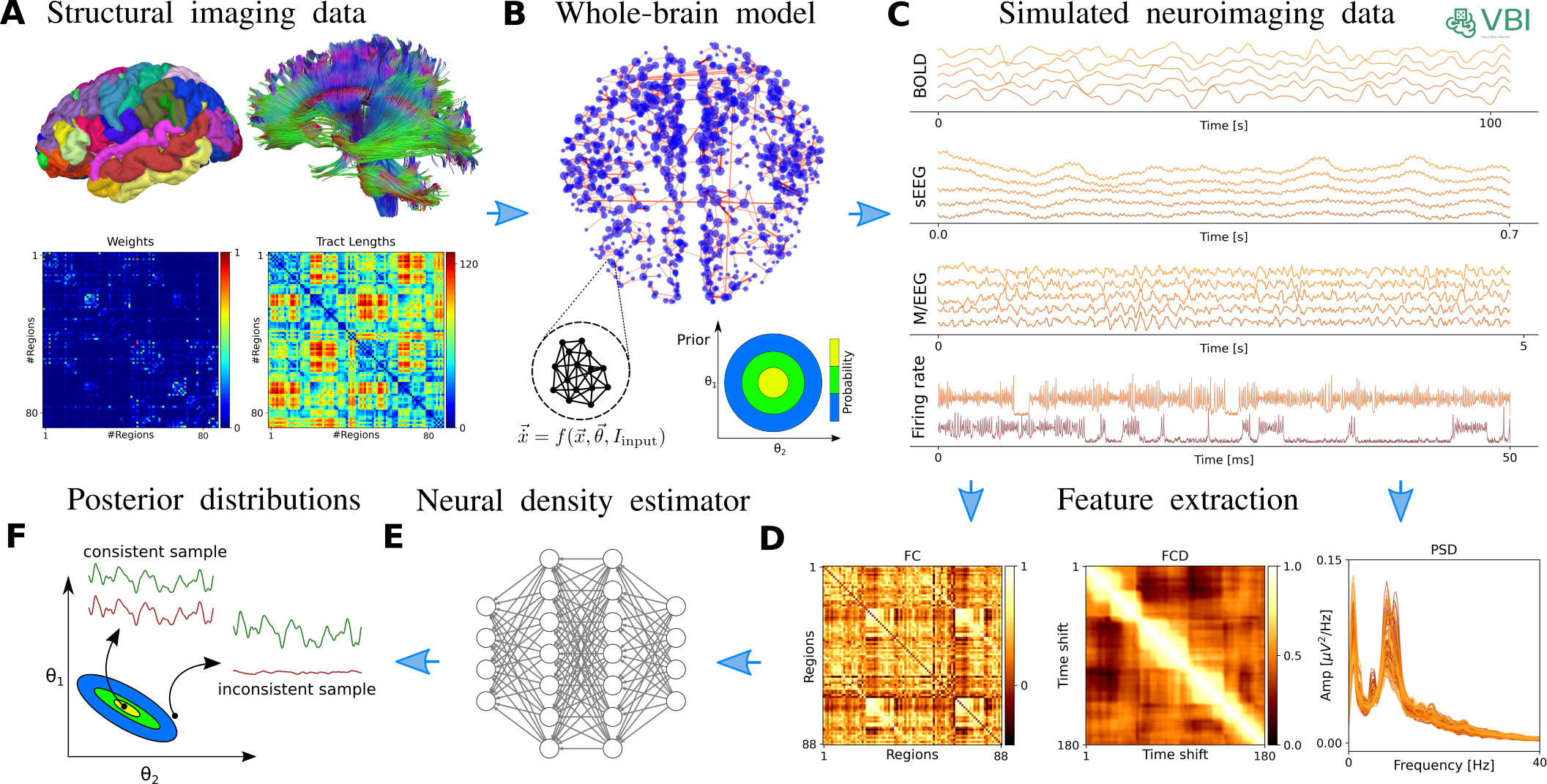
Installation
conda env create --name vbi python=3.10
conda activate vbi
# from pip: Recommended
pip install vbi
# from source: More recent update
git clone https://github.com/ins-amu/vbi.git
cd vbi
pip install .
# pip install -e .[all,dev,docs]

# To skip C++ compilation, use the following environment variable and install from source:
SKIP_CPP=1 pip install -e .
Using Docker
To use the Docker image, you can pull it from the GitHub Container Registry and run it as follows:
# Get it without building anything locally
# without GPU
docker run --rm -it -p 8888:8888 ghcr.io/ins-amu/vbi:main

# with GPU
docker run --gpus all --rm -it -p 8888:8888 ghcr.io/ins-amu/vbi:main


# or build it locally:
docker build -t vbi-project .                      # build
docker run --gpus all -it -p 8888:8888 vbi-project # use with gpu

# Open the browser and go to
http://127.0.0.1:8888

#Adding Your Notebooks
#If your notebooks are in /path/examples. To access them in Jupyter, add the volume mapping:
docker run --gpus all -it -p 8888:8888 -v /path/examples:/app/notebooks vbi-project
#In the Jupyter interface, you’ll see a notebooks directory containing your .ipynb files.
import vbi
vbi.tests()
vbi.test_imports()

#             Dependency Check

# Package      Version       Status
# ━━━━━━━━━━━━━━━━━━━━━━━━━━━━━━━━━━━━━━━━━
# vbi          v0.1.3        ✅ Available
# numpy        1.24.4        ✅ Available
# scipy        1.10.1        ✅ Available
# matplotlib   3.7.5         ✅ Available
# sbi          0.22.0        ✅ Available
# torch        2.4.1+cu121   ✅ Available
# cupy         12.3.0        ✅ Available

# Torch GPU available: True
# Torch device count: 1
# Torch CUDA version: 12.1
# CuPy GPU available: True
# CuPy device count: 1
# CUDA Version: 11.8
# Device Name: NVIDIA RTX A5000
# Total Memory: 23.68 GB
# Compute Capability: 8.6
Contents:
Examples
Contents:
- Intro
- Introduction to feature extraction
- Damped Oscillator - C++
- Damped Oscillator - numba
- Virtual Epileptic Patient
- Montbrio SDE model using Cupy
- Montbrio SDE model using Numba
- MPR model in C++
- Montbrio SDE model, C++
- MPR model from tvbk
- Jansen-Rit whole brain C++ implementation
- Jansen-Rit whole brain CuPy implementation
- Jansen-Rit whole brain Numba imentation
- Wong - Wang DMF
- Generic Hopf model cupy
- Wilson-Cowan SDE model in Cupy
- Wilson-Cowan SDE model in Numba
- Wong-Wang SDE Full Model, Cupy
- Wong-Wang full model implemented in Numba
API Reference